



WordPress Admin not working perfectly. How to solve?
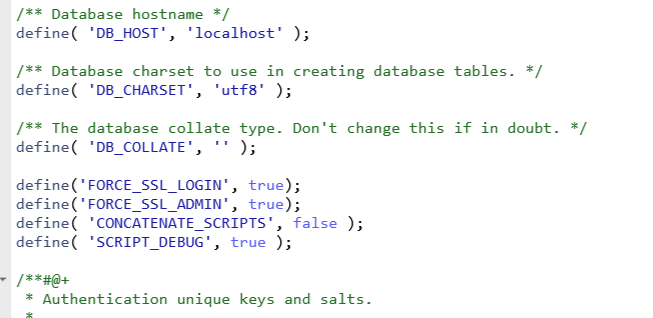
It is very easy to solve. Just add the following to the wp-config.php file define(‘FORCE_SSL_LOGIN’, true); define(‘FORCE_SSL_ADMIN’, true); define( ‘...
Read More
It is very easy to solve. Just add the following to the wp-config.php file define(‘FORCE_SSL_LOGIN’, true); define(‘FORCE_SSL_ADMIN’, true); define( ‘...
Read More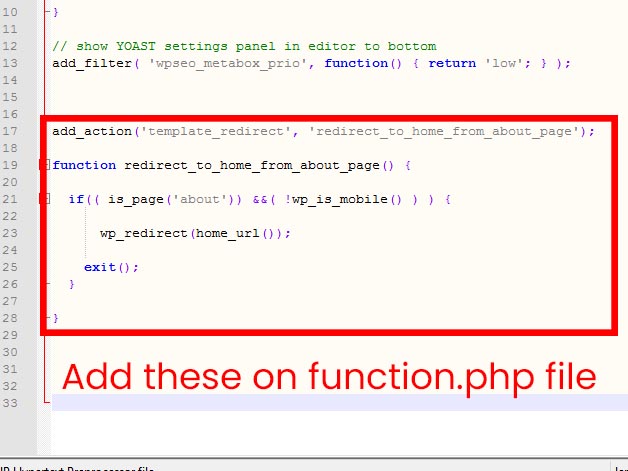
Just add these code to function.php file add_action(‘template_redirect’, ‘redirect_to_home_from_about_page’); function redirect_to_home_from_about_page() { ...
Read More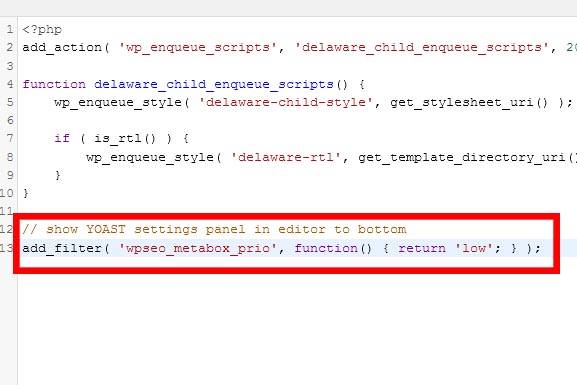
On Function.php file. Just add the line add_filter( ‘wpseo_metabox_prio’, function() { return ‘low’; } );
Read MoreJust add this on config.php file ini_set('display_errors','Off'); ini_set('error_reporting', E_ALL ); define('WP_DEBUG', false); define('WP_DEBUG_DISPLAY', false);
Read More<script src=’https://www.google.com/recaptcha/api.js’></script> <div class=”g-recaptcha” data-sitekey=”REPLACE_WITH_YOUR_KEY_HERE”...
Read More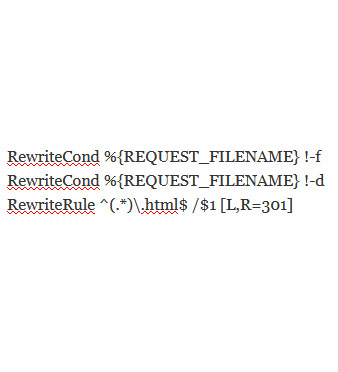
To open .htaccess file using FTP and add these following codes RewriteCond %{REQUEST_FILENAME} !-f RewriteCond %{REQUEST_FILENAME} !-d RewriteRule ^(.*)\.html$ /$1 [L,R=301]
Read More
Get your blood tests delivered at home Collect a sample from thenews
By signing up, you consent to receive marketing emails in line with our privacy policy